MP3 to sheet music, for piano
Drop in an MP3 of piano playing and Tavim writes out every note as a score you can print or edit.
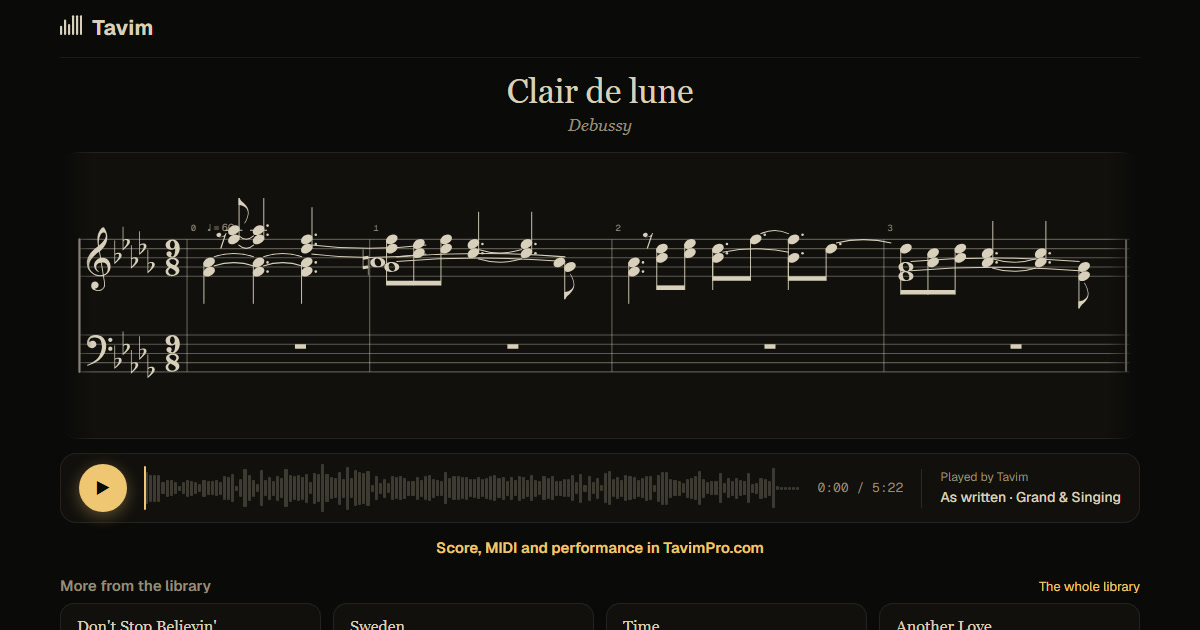
What you get
The score of the MP3, both hands, in bars, with its key, metre and tempo. Each note lights up as the MP3 plays, so you see exactly where the music is.
Export it as MusicXML for MuseScore or Sibelius, or as MIDI with every note's timing and loudness. To print, share the score as a link: its page gives you the PDF.
You also hear the same performance replayed on a clean piano, which makes a muddy MP3 much easier to follow.
An MP3 is often all there is of a piece: a recital, a lesson, an old recording someone sent you. Tavim writes what it hears into a score you can keep working on. On a computer you can correct a note in place, its pitch, octave or length, before you export, and the MusicXML and MIDI carry your corrections.
How it works
- Drop the MP3 on Tavim. Any audio file works: MP3, WAV, M4A, FLAC and more.
- Tavim takes the piano out of the mix and writes down every note it hears.
- Open the score, play it with the notes lit, and export or share it.
What works best
An MP3 where the piano is clear works best, solo or in front of other instruments. Recordings up to an hour are taken.
On well-known pieces the bars follow the music most reliably. On your own playing they are Tavim's best reading, and any note can be corrected on the score.
The quality of the MP3 matters less than how clearly the piano is heard. A low bit rate is fine; heavy reverb or a loud band over the piano makes the notes harder to hear.
Your projects are private to you until you share a link. Tavim is free while it is in beta: 50 actions a month, and a new transcription is one.