Learn a piano piece from a recording
See every note of a recording lit on the score, so you can follow and learn it bar by bar.
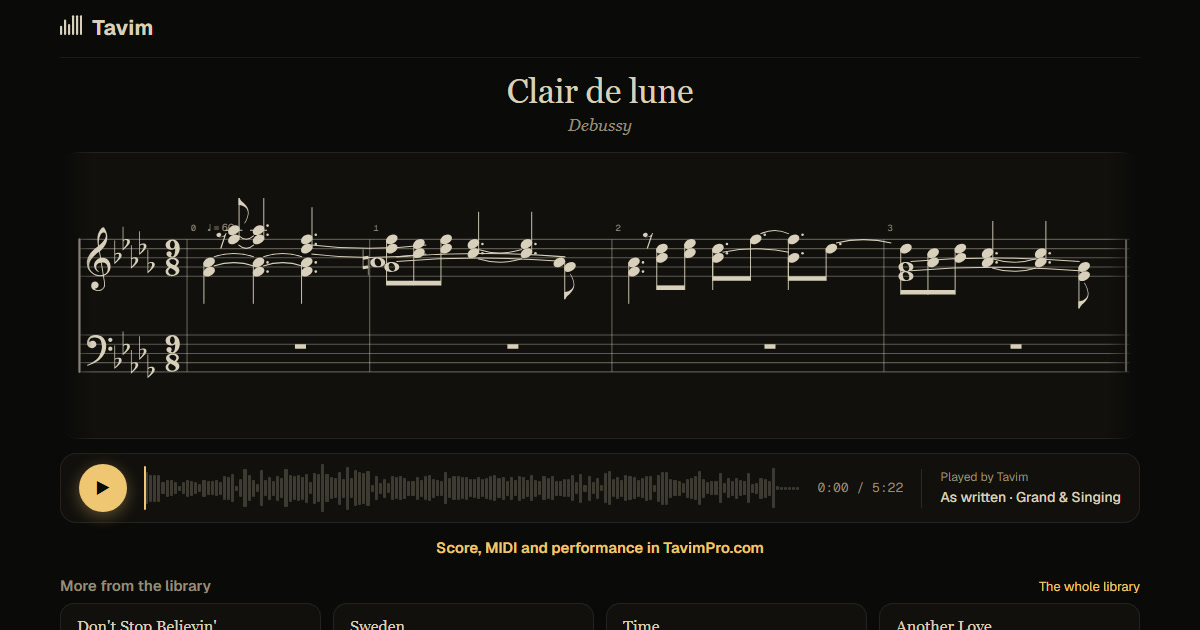
What you get
The score of the recording, both hands, with every note lighting up as it sounds, so your eye always knows where the music is.
Drag across bars to loop them and hear that passage again and again. Switch between the recording and its replay on a clean piano, and share the score as a link with its PDF to practise from paper.
Learning from a recording usually means stopping, rewinding and guessing. With the score lit as it plays, you see the notes as you hear them, both hands, in bars. Loop a hard passage until it sits under your fingers, and switch to the clean replay when the recording is hard to hear.
On a phone you can open the score, play it with the notes lit and follow along at the piano; looping and correcting notes are on a computer.
How it works
- Drop the recording, or sign up and paste a link to it.
- Tavim writes the score.
- Play it with the notes lit, loop the bars you are learning, and practise along.
What works best
A recording with clear piano works best. Recordings up to an hour are taken.
On well-known pieces the bars are most reliable. Loops play at the recording's own speed.
The score is Tavim's transcription of the recording, so on a piece you know well, check it against your ear; you can correct notes on a computer. Audio and video files in most formats are taken, up to 2 GB a file.
Your projects are private to you until you share a link. Tavim is free while it is in beta: 50 actions a month, and a new transcription is one.